


Collage Maker & Photo Editor
4.922.82K Reviews
App Specs
- Version
- 9.5.3.2
- Updated On
- License
- Free
- Downloads
- 50,000,000+
- Developer
- Pic Collage Maker & Photo Editor
- Categories
- Photography
- Platform
- Android, iOS
Screenshots





 Analysis by AppCompare
I reach for a collage app when a handful of photos tell a better story together than they do one by one. Collage Maker & Photo Editor is aimed squarely at that job: it combines photo layouts with editing and decoration tools, so I can turn a set of everyday pictures into one shareable image without switching between several apps. The key question is whether that convenience suits the way you make and use collages, and whether the free access is enough for your needs.
What the price tells me—and what it does not
The app is free to download, with in-app purchases listed from $0.99 to $21.99 per item. That makes it easy to try the basic experience before deciding whether anything paid is worth considering. I would not treat the presence of purchases as a reason to spend automatically: first make a few collages using the tools available to you, then judge whether a particular paid option would solve a real problem in your workflow.
There is a meaningful difference between “free to start” and “everything you might want is included.” The purchase range tells me that some extras cost money, but it does not tell me which ones you will encounter or whether a particular item is essential. So my practical advice is to check the purchase details in the app before committing, and to avoid buying something just because it appears while you are in the middle of editing. A collage can usually wait until you have decided what you actually need.
Where the value comes from
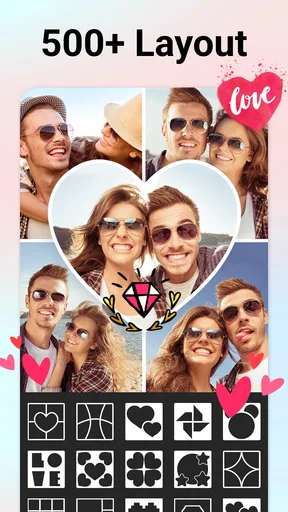
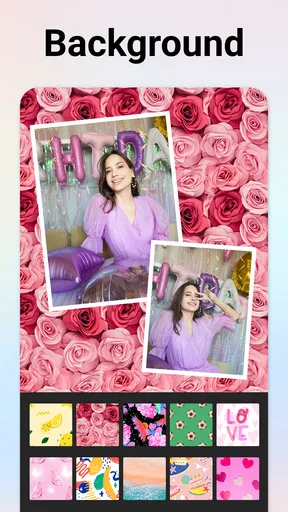
The strongest value here is having several collage-making jobs in one place. I can arrange photos, add text or stickers, and make basic visual adjustments without first preparing every image in a separate editor. That matters most for casual projects: a set of holiday snapshots, a birthday montage, a before-and-after pair, or a small collection of pictures from the same afternoon. The app’s store information describes more than a thousand options across layouts, grids, stickers, text, backgrounds, frames, and cutouts, giving users plenty of directions to explore.
That range is useful, but choice can also slow you down. If I am making a quick collage, I get better results by deciding on the photos and the purpose first, then picking a layout that supports them. A grid is usually the sensible choice when every image deserves similar attention. A more expressive arrangement can work when one photo should lead and the others act as supporting details. Starting with a clear hierarchy keeps decoration from taking over the story.
For a realistic everyday example, imagine I have several pictures from a family gathering and want to send one image to relatives rather than a string of separate messages. I can choose a layout, crop each photo so faces and important details remain visible, then add a short label or date if it helps. The useful part is not simply that the app offers many embellishments; it is that the whole task can stay together in one editing session. I would keep the design restrained for a family update, since too many stickers or text styles can make a warm set of photos harder to read.
Trade-offs in the editing workflow
A collage editor naturally involves more decisions than a simple photo viewer or a one-tap filter app. You have to balance image size, cropping, spacing, text, and decoration, and those choices become more noticeable when the source photos have different lighting or framing. I would check every image at the end rather than assuming the layout has treated them all equally: a face near an edge, a clipped sign, or an awkward crop can undermine an otherwise polished result.
Worth Reading Before You Choose

EA SPORTS FC Mobile 26 Is a Bigger Football Game, but It Takes Time

Flipboard Shows What News Apps Must Do Beyond the Feed

Switching to Android Auto Means Rethinking Your Driving Routine

Google Calendar Makes a Crowded Week Easier to Manage

Ludo King Makes the Most of the Minutes Between Plans

Baby Panda World Brings Quick Play to Modern Phones, but Its Game Library Feels Busy
There is also a difference between making an attractive collage and doing detailed photo retouching. The app brings collage tools and photo editing together, which is convenient for quick adjustments, but someone who needs precise control over individual images may prefer a dedicated photo editor for that part of the job. My approach would be to correct any important photos first if they need careful work, then use the collage app to arrange and finish the composition.
Another trade-off is creative freedom versus consistency. A large collection of layouts and decorative choices gives you room to experiment, but it can be easy to mix too many fonts, colors, or sticker styles in one project. I find it helpful to choose one visual idea and stick to it: for example, use a simple grid and one short caption, or choose a playful arrangement but keep the text plain. That small constraint makes a collage feel intentional rather than crowded.
Who is likely to get the most from it
I can see this working well for people who regularly combine photos for social posts, family messages, small celebrations, or personal keepsakes. It is also approachable if you have not used a design app before and want to experiment without learning a complicated desktop-style workflow. The app is rated for Everyone, and its broad set of collage and decoration tools makes it relevant to a wide range of casual projects.
It is less compelling if you almost never combine images, prefer editing each photo separately, or need a highly controlled design workflow for professional work. In those cases, a basic built-in collage feature may be enough, or a more specialized editor may offer the precision you actually need. I would also skip it if you know you want a completely minimal tool and find menus of creative choices distracting; the appeal here is variety, and variety only helps when you want to use it.
Compared with the usual alternatives, this app sits between a phone’s simplest built-in collage option and a more involved graphic-design or photo-editing program. A basic alternative can be quicker when you only need to place a few images in a plain grid. A dedicated editor makes more sense when fine adjustments matter more than speed. This app’s middle ground is most useful when you want layout choices and playful finishing touches without turning a casual photo task into a larger design project.
Small choices that make a better collage
One practical tip is to choose photos with a shared point of interest before opening the editor. If the images all show the same person, place, or event, a layout feels coherent with less decoration. If they are very different, use a clear lead image and keep the other frames simpler. This is a more reliable starting point than browsing stickers first and trying to build a story around them afterward.
I would also treat text as information, not filler. A short date, name, or location can help a collage make sense later, especially if you save it as a personal keepsake. If the text is only there to fill an empty corner, it may be better to leave that space alone. Before saving, I would inspect the smallest photo slots and check that captions remain legible; a design that looks balanced at a glance can still hide useful details in a cramped frame.
What to expect from the app
Pic Collage Maker & Photo Editor is the developer behind this photography app. It has a 4.9 average from around 1.1 million ratings, with about 23,000 written reviews, and has been installed over 50 million times. Those figures suggest it has found a large audience, but they cannot tell me whether its particular layout choices will suit your taste; the best test is to build a small project of your own.
The app is free, carries an Everyone age rating, and its listed release date is April 27, 2016. Version 9.5.3.2 is listed for devices running Android 7.0 or later. These details help establish whether it is a possible fit for your device and household, while the in-app purchase range is a reminder to review any optional spending before buying.
First Impressions and Features
When I first opened Collage Maker & Photo Editor, I was greeted with a sleek and user-friendly interface. The design is intuitive, so you don't feel like you need a manual to navigate through the features. Everything is laid out clearly, which is a big plus for those of us who want to dive straight into creative mode without fuss.
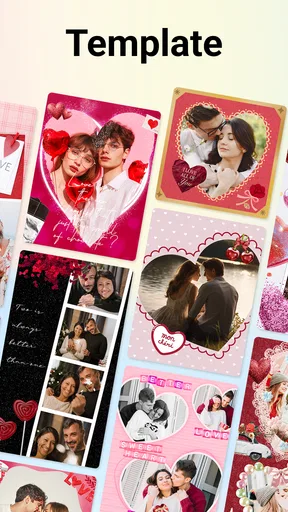
The app offers an impressive array of templates and layouts. You can choose from classic grids to more artsy, freeform styles. There’s something for every mood and occasion. What I love is that you can easily adjust the size and shape of each photo slot, making it super customizable. Plus, it supports high-resolution images, so your creations always look crisp and clear.
Editing Tools Galore
Let’s talk about the editing tools, because they’re nothing short of amazing. You’ve got all the basics like cropping, rotating, and adjusting brightness and contrast. But what really sets this app apart are the advanced features. There are filters galore, and they’re actually good! None of that cheesy stuff – these are filters you’d actually want to use. You can also play around with overlays and textures to add that extra touch of pizzazz.
One feature I found particularly fun is the stickers. There’s a massive collection to choose from, ranging from cute and quirky to elegant and sophisticated. And if stickers aren’t your thing, you can add text in various fonts and colors to personalize your collage. It’s like having a mini graphic design studio right in your pocket!
Sharing and Saving Creations
Once you’ve crafted your masterpiece, sharing it is a breeze. The app seamlessly connects to all major social media platforms, so you can post your collages directly to Instagram, Facebook, or wherever your audience awaits. You can also save your designs to your device in multiple formats, which is handy if you prefer to keep your creations offline.
One feature that stood out to me is the app’s ability to save your projects. This means you can come back to unfinished work without losing any progress. It’s a lifesaver for those busy days when you can only spare a few minutes at a time.
Performance and Accessibility
In terms of performance, the app runs smoothly on both Android and iOS. I didn’t experience any lag or crashes, even when working with larger files. This reliability is crucial, especially when you’re in the middle of a creative flow and can’t afford any interruptions.
The app is also incredibly accessible. It’s designed to be used by everyone, regardless of their level of tech-savviness. The tutorials and tips sprinkled throughout the app are a nice touch, offering guidance without being overbearing.
Final Thoughts
Overall, Collage Maker & Photo Editor is a fantastic app for anyone looking to elevate their photo game. It’s packed with features that cater to both beginners and seasoned pros, and it strikes a perfect balance between functionality and fun. The ability to create, edit, and share stunning collages all in one place is a dream come true.
If you’re on the hunt for a reliable and versatile collage-making app, I’d say give this one a shot. It’s a creative powerhouse that’s bound to keep you entertained and inspired. Happy collaging!
My buy-or-skip verdict
I would try it if I wanted a flexible way to bring photos together, especially for informal sharing or keepsakes. The free download makes that first test low-commitment, while purchases mean I would check what is included before paying for extras. I would skip it if my main need were detailed retouching, a strict professional layout process, or the quickest possible plain grid.
For me, its appeal is the combination of arrangement and decoration in one approachable place. I would begin with a small, practical project, keep the layout focused, and only explore paid options if a specific feature becomes important to the way I work. That is a fair way to find out whether its creative range is genuinely useful to you rather than simply tempting to browse.
Pros
- Easy-to-use interface for quick edits.
- Wide variety of templates and frames.
- High-quality export options available.
- Seamless integration with social media.
- Regular updates with new features.
Cons
- Ads can be intrusive during editing.
- Some features require in-app purchases.
- Occasional crashes on older devices.
- Limited text customization options.
- Watermark on free version exports.
FAQs for Collage Maker & Photo Editor
What features does Collage Maker & Photo Editor offer?
Collage Maker & Photo Editor provides a wide range of features including customizable collage layouts, a variety of photo editing tools, filters, stickers, text overlays, and backgrounds. Users can easily adjust brightness, contrast, and saturation, as well as apply artistic effects to enhance their images. The app also supports high-resolution output for professional-quality results.
Is the app easy to use for beginners?
Yes, Collage Maker & Photo Editor is designed with an intuitive interface that makes it accessible for beginners. The app offers step-by-step guidance and tooltips to help users navigate through its features. Additionally, the drag-and-drop functionality for creating collages simplifies the process, allowing even novice users to create stunning images effortlessly.
Are there any in-app purchases or subscriptions?
While Collage Maker & Photo Editor is free to download, it does offer in-app purchases and subscription options. These purchases provide access to premium features such as exclusive filters, advanced editing tools, and an ad-free experience. Users can choose between one-time purchases or monthly subscriptions depending on their needs and preferences.
Does the app support social media sharing?
Yes, Collage Maker & Photo Editor includes comprehensive social media integration. Users can easily share their creations directly to platforms like Instagram, Facebook, and Twitter. The app also allows for customization of image dimensions to suit specific social media requirements, ensuring that your photos look perfect when posted online.
What are the system requirements for the app?
Collage Maker & Photo Editor is compatible with both Android and iOS devices. For optimal performance, Android users should have version 5.0 or higher, while iOS users should have version 11.0 or later. The app is optimized to run smoothly on most smartphones and tablets, but users with older devices may experience reduced performance.


